AI based Legal Highlighter: A Smart GenAI Chrome Extension for Understanding Legal Terms Instantly

Understanding legal documents, online judgments, contracts, or news articles can be overwhelming for non-lawyers and even for tech professionals. Legal terminology is dense, context-sensitive, and often buried inside long paragraphs. To solve this real-world problem, I developed a GenAI-powered Chrome extension called the AI based Legal Highlighter.
This tool automatically detects legal terms on any webpage and provides instant, AI-generated explanations using a multi-layered intelligence system. Whether you are a student, developer, journalist, entrepreneur, or simply someone trying to understand legal content better, this extension bridges the gap between legal language and everyday understanding.
This article explains what the AI based Legal Highlighter is, how it works internally, how to install it, and why it stands out among existing tools.
Table of Contents
What Is AI based Legal Highlighter?
AI based Legal Highlighter is a Chrome extension built using Generative AI that scans webpages in real time, identifies legal terms, highlights them visually, and shows contextual definitions on hover.
Unlike simple keyword-based tools, this extension uses a smart fallback mechanism powered by OpenAI and Tavily, ensuring that even rare or jurisdiction-specific terms (like IPC sections) are explained accurately.
Key Capabilities at a Glance
- Automatic detection of legal terms such as:
- IPC sections (IPC 420, IPC 302)
- Sections (Section 21, Section 302)
- Articles, statutes, and common legal phrases
- Multi-tier definition lookup system
- AI-generated legal explanations
- Lightweight, fast, and privacy-conscious
- Works on any website
Why I Built This Tool
Most legal content on the internet assumes prior legal knowledge. Even simple terms like indemnity, force majeure, or Section 302 can be confusing without context.
Existing solutions often fail because:
- They rely only on static dictionaries
- They do not understand legal context
- They are limited to specific websites
The AI based Legal Highlighter was designed to:
- Work universally
- Adapt to different legal terminologies
- Provide human-readable explanations instantly
Core Features of AI based Legal Highlighter
1. Automatic Legal Term Detection
The extension scans the webpage’s text nodes and identifies legal terms using:
- Pattern-based detection (IPC, Sections, Articles)
- A curated local legal dictionary
Detected terms are visually highlighted, making them easy to spot while reading.
2. Intelligent Multi-Tier Lookup System
This is where the extension truly shines.
When a legal term is detected, the extension follows this flow:
- Local Legal Database
- Dictionary API + OpenAI Evaluation
- Tavily Web Search
- AI Synthesis using OpenAI
This ensures both speed and accuracy.
3. Interactive Tooltips
Hovering over a highlighted term displays:
- The term
- A concise legal explanation
- The source (Local / AI / Web Search)
No page reloads. No popups. Just instant clarity.
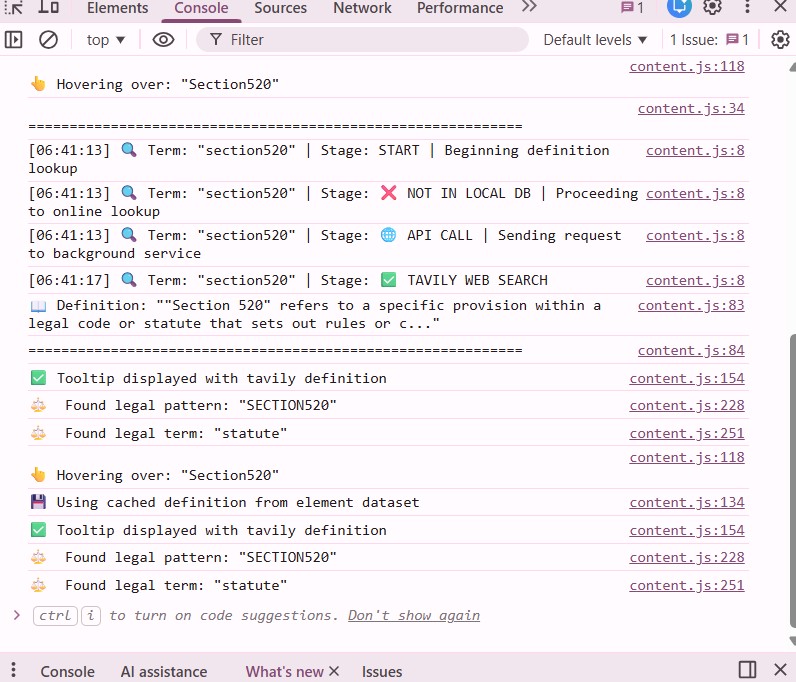
4. Developer-Friendly Debug Logs
For transparency and debugging, the extension logs:
- Detected terms
- Lookup stages
- API fallbacks
This makes it ideal for developers and contributors.
Installation Guide (Step-by-Step)
Step 1: Get Required API Keys
You need two API keys.
OpenAI API Key
- Visit: https://platform.openai.com/api-keys
- Create an API key
- Copy the key (starts with
sk-)
Tavily API Key
- Visit: https://tavily.com
- Sign up for a free account
- Generate your API key (starts with
tvly-)
Step 2: Install the Chrome Extension
- Download or clone the repository:
https://github.com/subasen85/legal-highligter-ai.git - Open Chrome and navigate to:
chrome://extensions - Enable Developer Mode (top-right corner)
- Click Load unpacked
- Select the project folder containing:
manifest.jsoncontent.jsbackground.js
Step 3: Configure API Keys
- Click the extension icon in the Chrome toolbar
- Enter:
- OpenAI API Key
- Tavily API Key
- Click Save API Keys
- You should see:
“API keys saved successfully!”
Your extension is now ready.
How It Works (Technical Deep Dive)
Architecture Overview
The extension follows Chrome’s Manifest V3 architecture:
- content.js – Scans and highlights webpage text
- background.js – Handles API calls and AI logic
- popup.html / popup.js – Stores API keys securely
- legal-terms.json – Local legal dictionary
Step-by-Step Definition Flow
1. Page Scanning (content.js)
const legalPatterns = [
  /\bIPC\s*\d+[A-Z]?\b/gi,
  /\bSection\s*\d+[A-Z]?\b/gi,
  /\bArticle\s*\d+[A-Z]?\b/gi
];
The extension scans text nodes and highlights matches dynamically.
2. Local Database Check
if (legalTermsData.terms[cleanWord]) {
  return legalTermsData.terms[cleanWord];
}
If the term exists locally, the definition is returned instantly.
3. Background Service Lookup
If not found locally, the request is sent to background.js:
chrome.runtime.sendMessage({
  action: 'getDefinition',
  term: cleanWord
});
4. Dictionary + OpenAI Evaluation
const aiResponse = await fetch('https://api.openai.com/v1/chat/completions', {
  method: 'POST',
  headers: {
    'Authorization': `Bearer ${openaiKey}`
  }
});
OpenAI selects the most legally relevant meaning from dictionary results.
5. Tavily Web Search Fallback
For terms like IPC420:
fetch('https://api.tavily.com/search', {
  method: 'POST',
  body: JSON.stringify({
    query: `legal definition of ${term}`
  })
});
Results are synthesized using OpenAI to generate a clean definition.
Example: IPC Section Detection
When the extension encounters:
“He was charged under IPC421 and Section 302”
The system responds with:
- IPC421 → Explained via Tavily + AI
- Section 302→ Recognized as murder under IPC
All without page reload or manual search.
Privacy & Security Considerations
- API keys are stored using
chrome.storage.sync - No browsing data is collected or stored
- Only detected legal terms are processed
- API calls are minimal and cached
Who Can Benefit from AI based Legal Highlighter?
- Law students
- Journalists covering legal news
- Developers reading compliance docs
- Startup founders reviewing contracts
- Anyone confused by legal jargon
Frequently Asked Questions (FAQ)
1. Is AI based Legal Highlighter free to use?
Yes, the extension is free. API usage depends on OpenAI and Tavily free tiers.
2. Does it work on Indian legal terms?
Yes. It supports IPC sections, Articles, and Indian legal terminology.
3. Are my API keys safe?
Yes. Keys are stored locally in Chrome’s secure storage.
4. Can I add my own legal terms?
Absolutely. You can extend legal-terms.json with custom terms.
5. Does it slow down browsing?
No. The extension is lightweight and optimized.
Final Thoughts
The AI based Legal Highlighter demonstrates how Generative AI can solve real usability problems in everyday browsing. By combining static knowledge, AI reasoning, and web intelligence, this tool makes legal content accessible to everyone.
If this project resonates with you, explore the code, share feedback, or collaborate through the Contact Us page of TechToGeek.com.
🔗 Project Links
- GitHub Repository:
https://github.com/subasen85/legal-highligter-ai.git